
The short answer: choose by how you want to start
Choose Mimisy when you already have a photo and want a guided path: select an existing effect or video template, upload the required image, adjust the options that template supports, and inspect the credit quote before generating. Its image-to-video workflow is the more direct fit for turning a product photo, landscape, or travel image into a short visual without first choosing among video models.
Choose SpicyGen when its library or saved-reference system suits the project and you want to select a documented model, duration, and quality level. It also offers a Movie workflow for creating related scenes, continuing later scenes from prior frames, and stitching the completed clips into a sequence.
Neither platform is unlimited, and their credits are not interchangeable units. Mimisy calculates a job-specific quote from the chosen effect and available settings. SpicyGen publishes per-second rates for particular models. The right choice therefore depends less on the nominal credit balance and more on the route required to reach the intended result.
Mimisy vs SpicyGen at a glance
| Decision factor | Mimisy | SpicyGen |
|---|---|---|
| Starting source | A source photo uploaded for the selected effect; supported DUO video templates can require two labeled photo slots | A library-generated image, saved reference, or an external image recreated as a new AI reference |
| Creation route | Choose an image effect or video template, then use the controls exposed by that template | Choose a library or reference route, video model, duration, and quality |
| Cost calculation | Review a quote based on the effect, quality, duration, extra clips, or supported two-photo composition | Calculate credits from the named model, seconds, quality, and any additional reference processing |
| Credit structure | Prepaid passes with credit allocations; unused credits carry over and passes do not renew automatically | One-time credit purchases; purchased credits do not expire, according to the current credit documentation |
| Longer sequences | Some single-photo templates offer extra clips, with added duration and cost | Movie can continue a later scene from the preceding scene’s final frame and stitch completed scenes |
| Best fit | Direct, effect-led transformations of an existing photo | Projects that benefit from library assets, saved references, model selection, or multi-scene construction |
How the input workflows differ
Mimisy begins with the effect. You browse a template, check its sample, and provide a photo suited to that design. The template determines which duration, quality, and extra-clip choices are available. You can leave the prompt empty to use the preset or add a short, consistent direction, but a prompt does not switch models or reveal unsupported controls. Mimisy’s optional-prompt guide is useful when the preset is close to the goal and needs only a small adjustment.
This approach reduces setup decisions. For example, a shop owner with a clean product still can select an appropriate motion template, upload the image, review the exposed choices, and decide whether the quoted cost fits the job.
SpicyGen offers more than one starting route. An image made within its library can be animated directly, while a saved reference can support later creations. An external upload follows a materially different process: according to its current AI policy, the source is described and recreated as a new AI reference before animation. It is not necessarily the original pixels being moved. That distinction matters when a project depends on exact packaging, typography, or small visual details in the uploaded image.
In practical terms, Mimisy follows source photo → template → quote. SpicyGen follows library image or rebuilt reference → model settings → calculated cost. The first favors a guided transformation; the second favors a studio-style choice of asset route and video configuration.
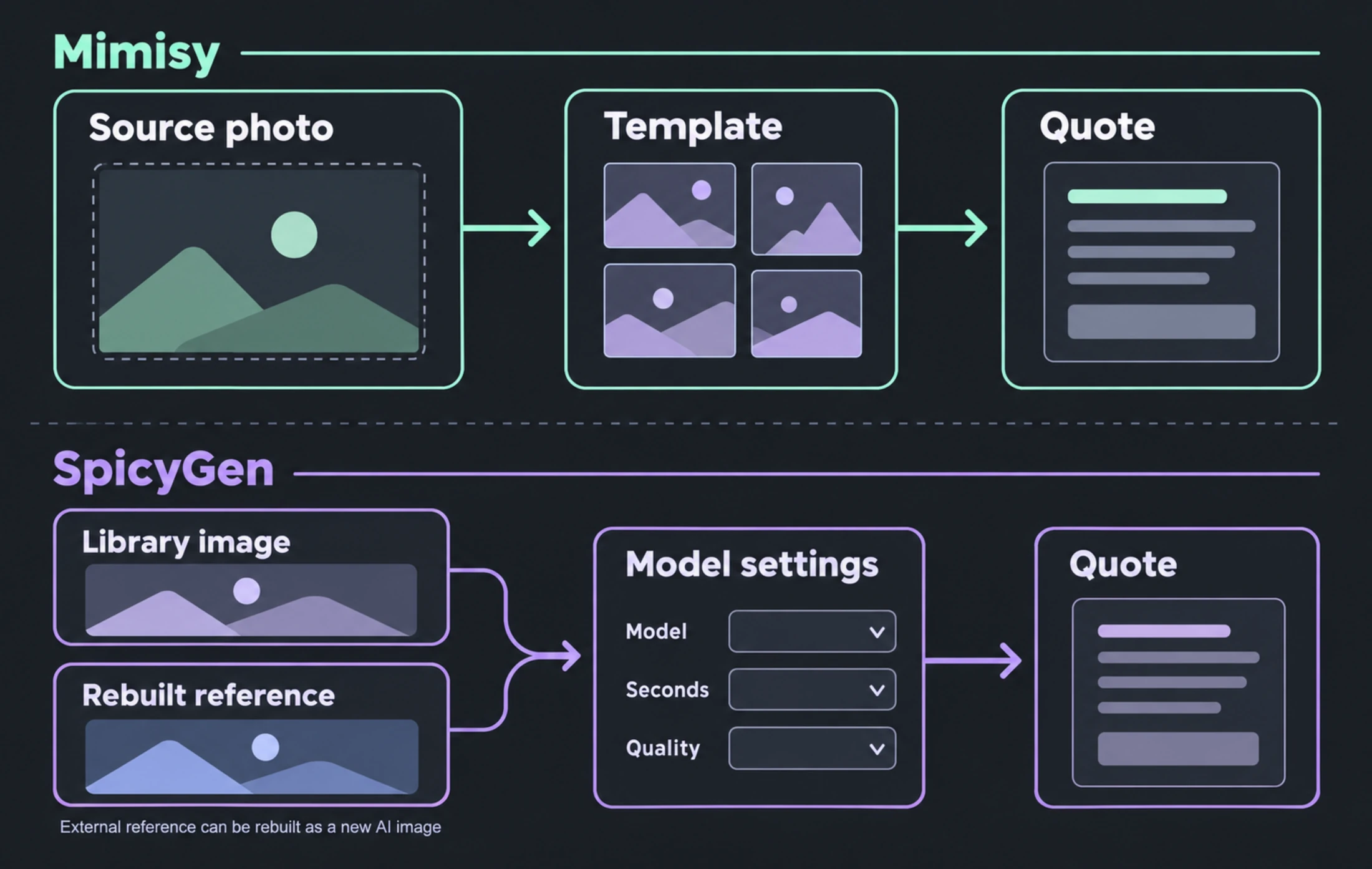
Mimisy uses a guided source-photo and template route; SpicyGen can start from a library image or a rebuilt external reference before video settings are selected.
Photo effects, video generation, and continued scenes
Mimisy separates image effects from image-to-video templates. A picture effect produces a new still-image treatment, while a video template adds motion according to the options offered for that effect. This separation helps when the desired result is simply a stylized product image rather than a clip.
Source preparation still matters. Use a clear, well-lit image in which the main subject is easy to recognize. Match its framing to the template sample: a wide landscape is a better starting point for a broad environmental composition than a tightly cropped image. A portrait-shaped preview does not guarantee portrait output, because the source and template also affect the result. The source-photo checklist provides more preparation guidance.
SpicyGen’s documented model route is more explicit about video configuration. SpicyMotion v3.0 supports durations from 3 to 15 seconds. SpicyMotion v3.0 Fast supports up to 30 seconds and includes native audio. These limits and capabilities belong to the named models; they should not be generalized to every option on the platform.
Its Movie feature is especially relevant to a multi-scene concept. A creator might establish a landscape frame, generate one scene, begin the next from the preceding scene’s final frame, and then assemble the finished scenes. This can improve visual continuity, but the result is a stitched sequence of completed scenes—not one uninterrupted generation.
What credits actually buy on each platform
Mimisy does not assign one universal cost to every video. The quote can change with the selected effect, quality, duration, supported extra clips, and two-photo composition. The welcome balance of 20 credits is only a starting balance; an individual quote can exceed it. This quote-first design lets you see the total before submitting rather than estimate the number of videos from the account balance alone.
Current Mimisy pricing lists these USD reference figures:
- Basic Monthly: $9.99 for 300 credits
- Pro Monthly: $29.99 for 1,500 credits
- Premium Monthly: $49.99 for 3,000 credits
The annual passes are prepaid once but do not deliver the entire year’s credits immediately. Basic costs $59.88 upfront and provides 12 monthly grants of 300 credits; Pro costs $179.88 for 12 monthly grants of 1,500; Premium costs $299.88 for 12 monthly grants of 3,000. The displayed monthly equivalents—$4.99, $14.99, and $24.99—are not recurring monthly charges. Unused credits carry over, and the passes do not renew automatically.
SpicyGen uses one-time, non-expiring credit purchases and publishes rates for specific models in its model documentation. SpicyMotion v3.0 costs 10 credits per second at Standard quality or 15 at HD. A five-second job therefore costs 50 Standard or 75 HD credits before any additional reference processing.
SpicyMotion v3.0 Fast costs 15 credits per second at Standard or 20 at HD, making the same five-second duration 75 or 100 credits respectively. These calculations apply only to those named models and settings. They do not establish a universal SpicyGen rate.
The key comparison is model + seconds + quality + extra processing on SpicyGen versus a complete effect-and-settings quote on Mimisy. A balance of 300 Mimisy credits cannot be compared directly with 300 SpicyGen credits because each system prices its work differently.
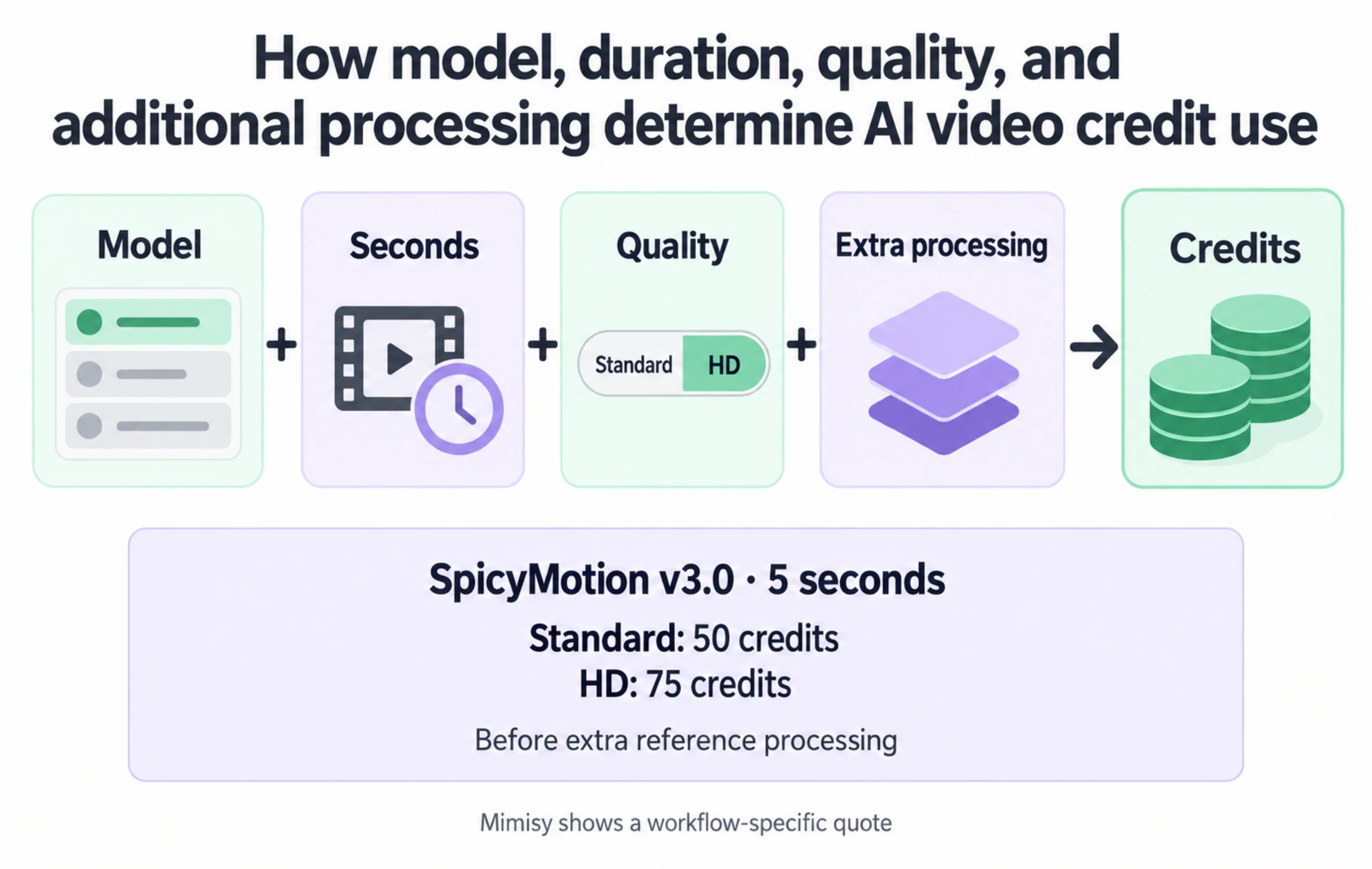
Credit use depends on the selected model and settings, while Mimisy presents a workflow-specific quote.
Which workflow fits common projects?
For a product photo that needs a single predefined movement, Mimisy is usually the shorter route. Select a suitable template, confirm that the framing works, keep the preset or add one brief direction, and read the final quote. If exact label text must remain untouched, inspect the finished result carefully because generative transformations can change fine detail.
For a travel photograph or landscape, the same choice depends on creative intent. Use Mimisy when an available effect already matches the motion you want. Consider SpicyGen when you prefer to work from a library image or rebuilt reference and explicitly select a model, duration, and quality.
For a cinematic moodboard with several related shots, SpicyGen’s continuation-and-stitching concept is the stronger match. Plan each scene as a separate generation and budget each one accordingly. Do not calculate the whole sequence as though it were one continuous clip.
Mimisy becomes more useful again when the goal is a contained photo effect rather than scene construction. Its guided route asks fewer model-level questions, while still showing the relevant generation cost before credits are spent.
Final choice: guided effect or configurable studio route
Choose Mimisy if you want to:
- Start directly from an existing photo.
- Browse a ready-made image effect or motion template.
- Use only the relevant controls instead of selecting a model manually.
- See a complete quote before submitting the job.
- Keep unused credits and buy prepaid access without automatic renewal.
Choose SpicyGen if you want to:
- Begin with its library or saved-reference system.
- Select between documented models, durations, and quality levels.
- Work with an external reference that may be rebuilt as a new AI image.
- Develop a sequence through continued and stitched scenes.
- Purchase a one-time credit balance that does not expire.
For the simplest way to evaluate Mimisy, prepare one clear ordinary photo, choose an effect whose sample fits its composition, and follow the first photo-to-video guide through the quote and generation steps. Completed creations can then be opened, viewed, and downloaded from My collection.
Find an effect for your next idea.
Browse the actual previews, choose your settings, and review the credit quote before you create.
Explore effects →