
No. Mimisy does not currently offer unlimited AI video generation. It uses credits and prepaid passes, with a credit quote shown before each request. For frequent experimentation, the important question is not how many “unlimited” videos a plan promises, but how many of your chosen templates and settings your balance can cover.
Mimisy is a template-based photo-to-video and image-effects product, not a conversational companion. Its passes provide defined credit allocations rather than unrestricted generation. You can compare the current Mimisy plans and USD reference prices before deciding how much capacity fits your workflow.
What credit-based generation means
A Mimisy credit balance is spending capacity, not a fixed number of videos. Each request receives its own quote after you choose an effect and configure the options that effect supports.
The typical video workflow is straightforward:
- Choose an existing effect or template.
- Upload a suitable source photo.
- Select the quality, duration, and other options exposed by that template.
- Optionally add a short prompt.
- Read the credit quote before submitting the request.
This quote-before-generation system gives you a concrete cost for the request you are considering. It also means that statements such as “300 credits equal a certain number of videos” are unreliable without knowing the relevant quotes.
Picture effects use their own templates and generation quotes, separately from video effects. Mimisy also requires an account and verified email for actual generation. Completed results appear in My collection, where they can be viewed, opened, and downloaded.
Why the credit quote can change
There is no universal Mimisy rate for every video. The quote can be affected by the selected effect and the options it supports, including:
- Quality
- Duration
- Extra clips
- Two-photo composition in supported DUO workflows
An extra clip can extend a supported single-photo sequence, but it also adds to the credit cost. A genuine DUO workflow requires both labeled photo slots, and its quote includes the two-photo composition cost. A DUO label alone does not mean that every effect accepts two images.
Quality and duration are also template-dependent. Mimisy does not promise universal 4K output, native HD, or arbitrary video lengths across all templates. The available choices shown for the selected effect define what can be requested. The Mimisy image-to-video overview explains this template-led workflow.
Think of the quote as the result of a simple relationship:
Effect + available quality + available duration + optional extras = current credit quote
Change one of those inputs and the quote may change. Check it again instead of relying on the cost of an earlier configuration.
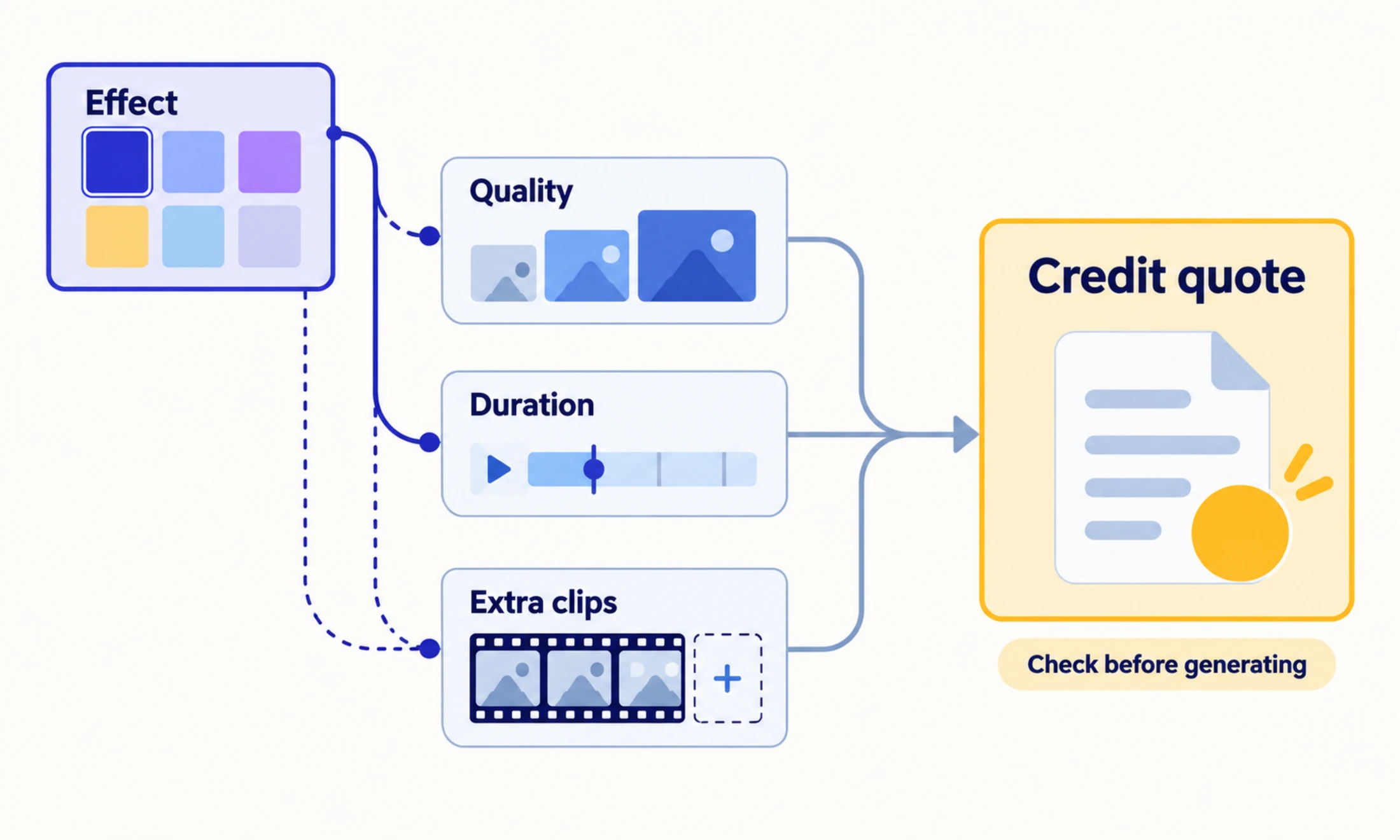
The displayed credit quote reflects the selected effect and the options that effect supports.
Monthly and annual Mimisy plans compared
Mimisy currently lists three monthly passes and three annual prepaid passes:
| Plan | Monthly pass | Annual prepaid pass |
|---|---|---|
| Basic | $9.99 for 300 credits | $59.88 paid upfront; 300 credits granted monthly for 12 months; $4.99/month equivalent |
| Pro | $29.99 for 1,500 credits | $179.88 paid upfront; 1,500 credits granted monthly for 12 months; $14.99/month equivalent |
| Premium | $49.99 for 3,000 credits | $299.88 paid upfront; 3,000 credits granted monthly for 12 months; $24.99/month equivalent |
These are USD reference figures. The final amount displayed by a payment channel may differ.
The annual monthly equivalents are comparison figures, not monthly charges. For example, the Pro annual pass requires one $179.88 upfront payment. Its $14.99 monthly equivalent expresses the annual price on a monthly basis; Mimisy does not charge that smaller amount every month.
Likewise, the credit quantities should not be presented as promised video totals. Basic provides fewer credits than Pro or Premium, but the number of completed requests still depends on the quote for each configuration.
How annual payment and credit grants work
An annual Mimisy pass is paid once, but the credits are delivered through 12 monthly grants. Buyers do not receive the entire year’s credits as one immediate lump sum.
For example, an annual Pro purchase provides a grant of 1,500 credits each month for 12 months. This structure can suit ongoing experimentation, but it may be less appropriate if you need an unusually large balance immediately for one short project.
Unused credits carry over, so an allocation does not have to be spent before the next monthly grant. The passes also do not renew automatically. That combination gives an irregular user room to build a balance without starting an automatic renewal cycle.
The distinction can be summarized as:
One upfront annual payment → monthly credit grants from Month 1 through Month 12 → unused credits carry over
For the detailed balance and billing rules, see Mimisy’s credits and payments guide.
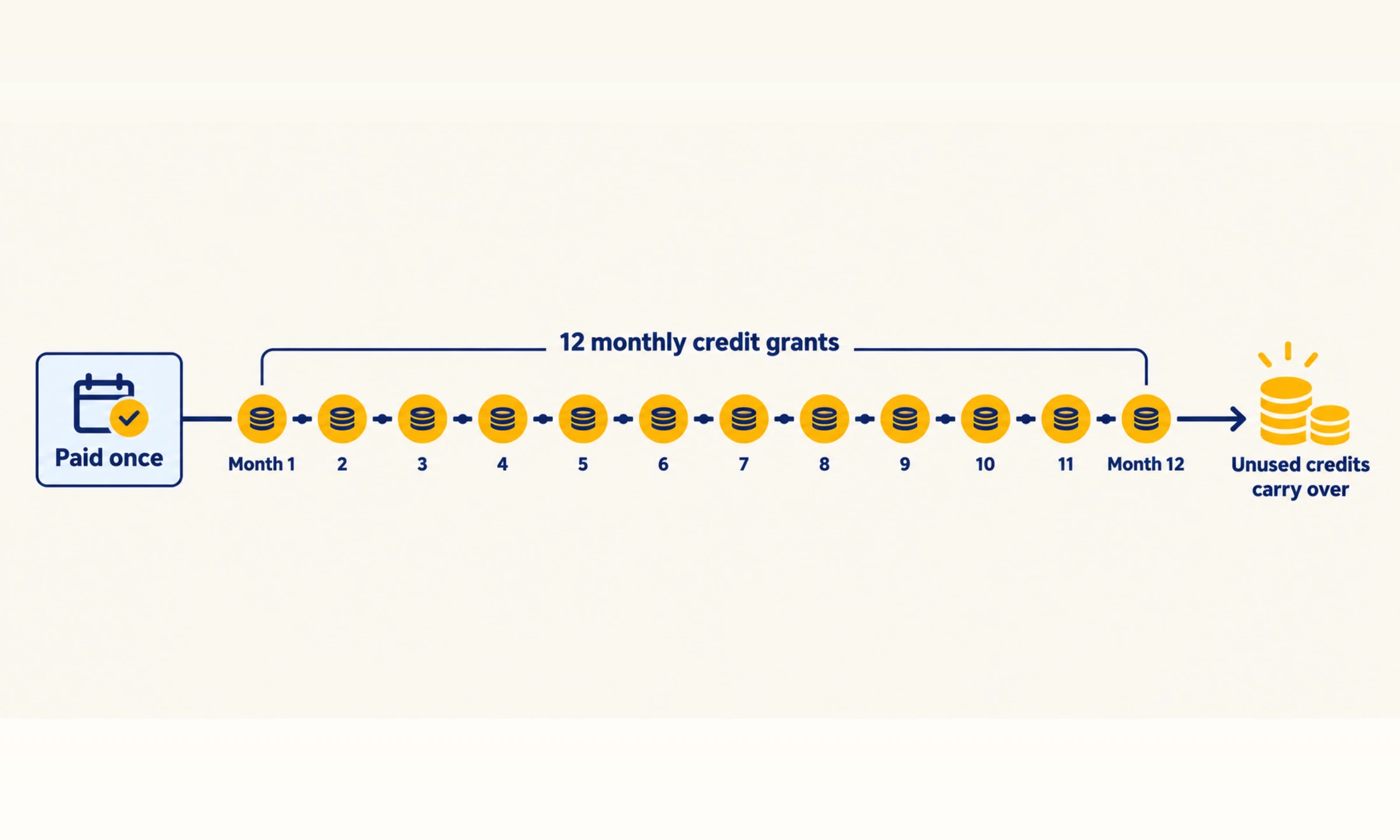
An annual pass is paid once, while credits are released monthly and unused balances carry over.
Do 20 welcome credits provide a free video?
Not necessarily. A new Mimisy account begins with 20 welcome credits, but this is a starting balance rather than a guaranteed free generation.
If a configured request is quoted at more than 20 credits, the welcome balance cannot cover it by itself. If the quote fits within the available balance, the request can be submitted. The quote shown for the actual effect and options—not the existence of welcome credits—answers whether that request is affordable.
This distinction matters because a template may offer different durations or other options. Avoid choosing settings first and assuming the opening balance will be sufficient. Configure the request, read the quote, and compare it with the balance before submitting.
How to estimate your video budget
For repeated requests using exactly the same configuration, use this symbolic formula:
Estimated completed requests = floor(available credits C ÷ displayed quote Q)
The floor operation means rounding down to a whole request. Keep Q symbolic until Mimisy displays the real quote. Changing the effect, quality, duration, extra clips, or supported DUO composition may change Q and therefore the estimate.
A mixed project needs a slightly different method. Suppose you want to animate a clean product photo, add gentle movement to a landscape, and create a short cinematic treatment for a travel image. Instead of applying one assumed rate to all three:
- Configure the product-photo request and record its quote.
- Configure the landscape request and record its quote.
- Configure the travel-image request and record its quote.
- Add the three quotes to estimate the first-attempt budget.
- Keep part of the remaining balance for selected revisions.
This produces a more useful estimate than dividing your balance by a guessed average. It also reveals which creative choice affects the budget most. If adding duration or another clip raises one quote substantially, you can decide whether that addition matters before spending the credits.
Make each experiment answer a clear question
Unlimited generation can encourage unfocused retries. A credit-based workflow works better when each variation has a purpose.
Start with a clear, well-lit, recognizable source image whose composition suits the effect. For a product animation, keep the item visible and unobstructed. For a landscape or travel image, choose framing that leaves useful space for the intended movement. A portrait-shaped preview does not force portrait output; the source and template can both affect the result’s aspect ratio. Mimisy’s source-photo guide provides additional preparation advice.
The prompt can be left empty when the preset already matches your goal. If you add one, keep it short and consistent with the selected effect, such as “slow camera push toward the product” or “gentle movement in the clouds.” A prompt can refine direction, but it cannot change the underlying model, create controls the template does not offer, or replace the available quality and duration settings.
For a controlled comparison, keep the photo, template, and most settings unchanged while varying one meaningful element. Review the result in My collection, decide what the variation taught you, and then determine whether another request is worthwhile. This makes the revision reserve serve a defined creative decision rather than a series of unrelated guesses.
Choose a pass from your quoted workload
Mimisy’s Basic, Pro, and Premium passes provide different credit allocations, but none offers unrestricted AI video generation. A monthly pass is the more flexible choice for a short project or an uncertain workload. An annual prepaid pass has a lower stated monthly equivalent for ongoing use, while still delivering credits in monthly grants rather than all at once.
The most reliable decision starts with a real configuration: choose the effect you intend to use, prepare an appropriate image, select the available options, and inspect the quote. Then compare that quote—and any revision reserve—with the credits supplied by each pass.
When you are ready to create, follow the Mimisy first-video guide to select an effect, provide your source, review the options and credit quote, and find the completed result in My collection.
Find an effect for your next idea.
Browse the actual previews, choose your settings, and review the credit quote before you create.
Explore effects →